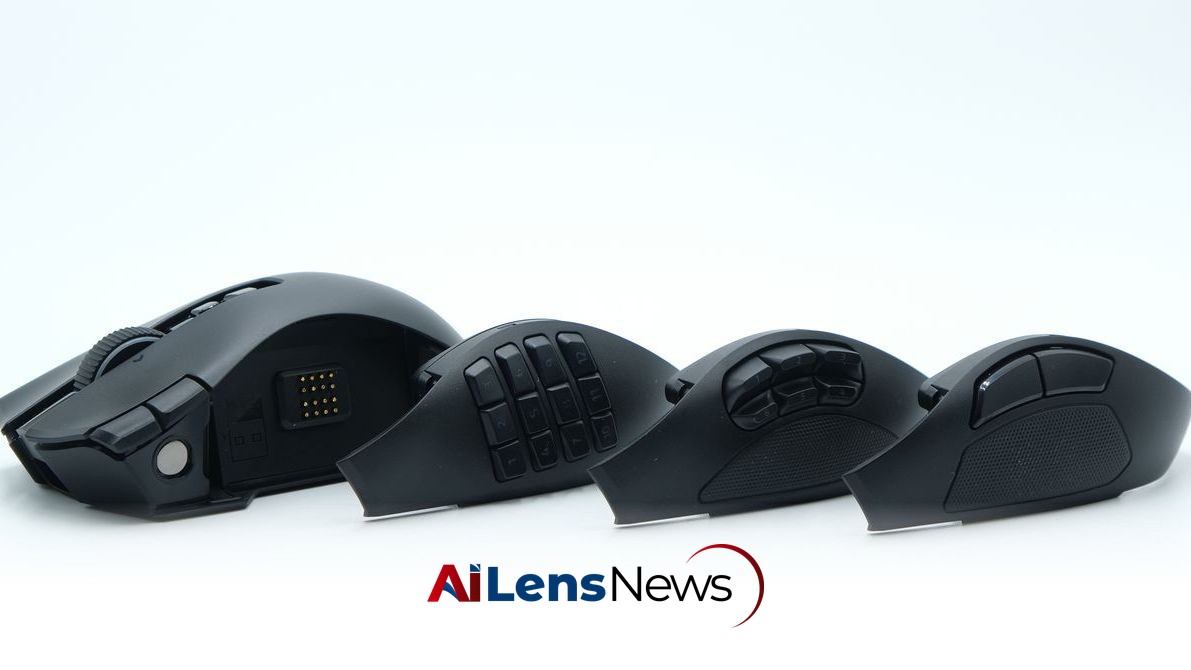


The Razer Naga V3 Pro combines comfort with extensive button options, making it a standout choice for gamers who prefer a feature-rich mouse.
Washington DC, United States Aug 11, 2026 ALN: One of my first gaming mice was the original Razer Naga Epic, which I was gifted as a teenager alongside my first gaming PC. Gaming has changed a lot in the past 15 years, and yet, the Razer Naga line hasn't changed much. Its general shape and function have remained remarkably consistent.
While PC gaming has come to emphasize ultra-lightweight, competitive mice designed for fast-paced shooters, that's not everyone's cup of tea. If you're a PC gamer who might prefer a more comfortable mouse—perhaps with some extra buttons—the new Naga V3 Pro just might be the best gaming mouse for you. The new model folds in some of the newest performance-focused innovations into a more practical and comfort-focused shape.
Comparing the current Naga to the models since 2015, the shape is nearly identical. The only major difference is the addition of a third mouse button. Recently, Razer has shifted its focus when refreshing mice for a new version: Instead of significantly redesigning the shape, new versions maintain a general silhouette and shell, while receiving significant updates to the internals. Considering how good the shapes of current offerings feel, it makes sense: There’s no reason to change purely for change’s sake, especially when something already works.
As far as that goes, the shell of the Naga V3 Pro is still quite nice. The large, wide shape is ideal for a palm grip, while still being usable with a claw. The third mouse button is a helpful touch, but with the locking mechanism underneath, I found its alternative use as a side support to be much more comfortable using either of these grips. (The third button was the most usable with a fingertip grip, where there wasn’t any risk of accidentally putting pressure on it.)
Really, the shape is ideal for long-term use. It’s fairly ergonomic, and it's easy enough to lay your hand across with a relaxed grip. I found it to be a great option for raid nights in Destiny 2 (with as many as five or six Crota runs in one night) and more chill games like The Big Walk, where precision and agility take a bit of a back seat to consistency and comfort.
While the Naga V3 Pro weighs 116 grams with the heaviest twelve-button side panel (the six-button panel is 115 grams, and the two-button is 113), the mouse doesn’t feel particularly heavy. The weight is all kept fairly low, and is distributed well across the mouse. Compared to some older mice with high-up batteries and nose-heavy shapes, the Naga hardly feels like its weight; I would’ve guessed it was below 100 grams if I hadn’t checked. You’ll notice the added heft if you’re switching directly from a 60 gram gaming mouse, but otherwise, this mouse manages its mass very well.
One downside to its old-school vibe is the limited color options. Black is the only version available, and while that'll always be the most popular (especially for Razer), a more niche mouse like the Naga V3 Pro could have definitely benefitted from another color.
This mouse has an absurd number of buttons. I found myself struggling to use all of them, but I’m sure there are quite a few people who still won’t think it’s quite enough.
Like the Logitech MX Master 4, the Naga incorporates a customizable mouse wheel with options for smooth or ratcheting operation, along with a “precision tactile” mode that decreases the space between each of the scrolling steps. The wheel also has a tilt function for horizontal scrolling; it’s ideal for spreadsheets and multimedia work that requires two axes of movement, but can just as easily be remapped to any number of macros (I could see it being useful for leaning to the left or right in a tactical shooter like Rainbow Six: Siege).
Drawing further comparisons to the MX Master line, I really found this mouse to be good for everyday work. The comfortable shape and extensive navigation capabilities made it great for multimedia work, and the number pad was ideal for mapping software-specific functions, especially for photo and video editing software that can require some repetitive and complex inputs.
Despite the sheer number of buttons, I really found that they never got in the way when not in use. All of them are placed in such a way to be easily accessible without disrupting the basic left and right click functionality. The only button I found myself regularly pressing on accident was the third click button, which can be locked entirely using a switch on the underside of the mouse.
Internally, this mouse is best described as over-engineered. The internals are robust, fastener-rich, and include some extra features for sturdiness that I wouldn’t otherwise expect. The internal plastic braces are all beefy, and there are plastic supports and cradles for the main buttons’ circuit boards. Comparing this mouse to any of the ultra-light models available today, it becomes obvious just how much effort goes into making them lightweight and what a mouse can look like when weight-savings stop being a priority.
The most interesting component is the scroll wheel, which is essentially a sealed box sitting atop three separate microswitches — two up front, for the rocking functionality, and a third in the back for the scroll wheel click. This design is ideal, since all three of the off-the-shelf microswitches can be replaced independently without having to open up the proprietary magnetic scroll wheel mechanism. While there is concern that the proprietary scroll wheel will fail, the Basilisk V3 (which uses a similar design for the mouse wheel) has readily-available third-party mouse wheels, and I would assume the same will hold true for this model.
Besides this, the internal design is robust—if complicated. There are no less than six separate circuit boards connected by ribbon cables, and a battery that connects using a standardized connector. This large number of boards marginally increases the complexity and, as a result, the risk of failures. But it also allows for each of the switches to connect directly to the button they sit underneath, creating a more “connected” feel when using the mouse. It's a worthwhile tradeoff when compared to the alternative option, which is one circuit board with long posts and mechanisms connecting the internal micro-switches to the buttons.
The Naga V3’s RGB lighting is as impressive as ever, with extensive customization and animations across the back logo and scroll wheel through Razer’s Chroma system. Only one of the three side panels, the twelve-button number pad, features RGB backlighting lighting. While I wouldn’t expect this for the basic two-button panel, I was disappointed that the six-button panel, which has numbered buttons, doesn’t feature any kind of lighting.
A mouse like this, with so many buttons and a macro-focused design, is naturally dependent on the software that powers it — much more so than a mouse with only two or three side buttons. Because of this, good software is a necessity. In this case, Razer Synapse works wonderfully. Customizations are easy to make, and take to the mouse instantly. Even complex macros are easy to rig up, and the mouse is able to immediately recognize which side panel is installed, not needing to restart or have any in-software changes made.
To learn more about the latest developments in Gadgets & Devices, stay updated with our exclusive reports and analyses on AiLensNews.