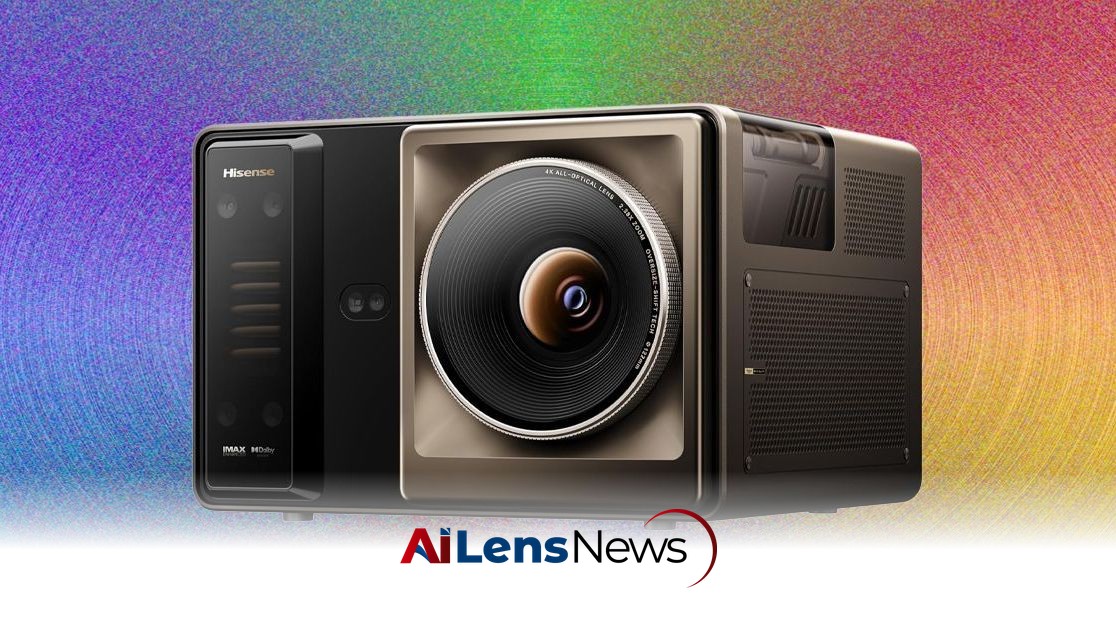


The Hisense XR10 Smart Projector brings RGB backlighting to the forefront, offering vivid colors and impressive performance for movie nights and gaming.
Washington DC, United States Jul 16, 2026 ALN: RGB backlighting is the hottest new tech in the world of televisions, bringing brighter and more colorful images to the world of LED screens. And now, projectors are following suit.
The Hisense XR10 is one such projector, rated at 6,000 lumens of brightness, with a jaw-dropping 6,000:1 for native contrast ratio, and it even comes with an adjustable iris for customizable aperture. Whether it truly creates a sense of wonder on movie night, however, may depend greatly on your content choices.
The XR10 is a beast. I felt a slight pinch in my back as I heaved it out of the included case and plopped it onto a table in my projector room. At 23.4 pounds, it's no joke to lug around, even compared to the 18-pound Titan Noir Max. I liked the design, though, since it’s just one dark metallic cube with a bronze faceplate on the front. The four tiny feet on the bottom are to make micro adjustments to find the perfect angle. Quite a few projectors I’ve tested recently only have front feet, so it’s handy to be able to make more height adjustments. Projectors with longer feet like the Titan Noir Max, however, allowed me to position that projector at more of a side angle and then adjust the feet.
Auto-keystoning is a fine art with some projector models, including on the lower-cost BenQ TK705STi projector I’m testing now. With the XR10, though, the setup process is straightforward in that the projector can map the projected image to your screen. That worked most of the time but required some manual tweaks for size and focus. The keystoning on the Epson Lifestudio Grand Plus projector took a lot more effort and time.
One dramatic difference between the XR10 and the Titan Noir Max is that Hisense runs on the VIDAA OS, which Hisense developed around 2014. It’s familiar to me because it’s the same OS used on the Leica Cine Play 1 projector but is normally only found on Hisense projectors. I didn’t mind too much that the Titan doesn’t even have a built-in OS because you can easily add a Google TV streamer or an Amazon Fire TV Stick for about $50.
The XR10 setup took only 10 minutes, which included both installing a few apps and setting the keystone and focus. Like the Leica software, the one missing app here was Fandango at Home, which I often use to buy and rent early-release movies.
Both the automated picture control options and advanced settings worked as intended. For example, I found the Enhanced picture mode setting to work perfectly fine for most of my test scenarios. That’s a stark departure from RGB TVs like the LG Micro RGB Evo, which require more customizations to improve brightness, color quality, and contrast.
An interesting design choice on the XR10 was to use liquid cooling to manage heat. The XR10 stayed mostly quiet during my testing window, even though there’s still a fan and it can be a bit loud. Some projector fans are so loud they distract from the movie you’re watching, but not this one. The built-in speaker is loud and clear, an unusual perk since so many projectors have lame audio.
For inputs, the XR10 has three HDMI ports, but only two of them run at the faster HDMI 2.1 spec. Also, the middle HDMI port is for eARC passthrough audio. I experienced quite a few issues with the eARC port using an Onkyo TX-RZ50 AV Receiver, such as dropped audio, black screen flashes, and other glitches. (Hisense is looking into this issue.) The XR10 has an Ethernet port for a connection, two USB ports, and both a digital optical and 3.5-mm port. Wi-Fi 7 support adds some great compatibility and reliability, plus a speedy connection.
I felt the XR10 remote was just OK. It’s a little busy and has too many buttons (including three just for controlling the settings). That can make it a bit confusing to use. That said, I liked that there are dedicated buttons for brightness across from the volume buttons. The Home button is centered and easy to find. It’s also backlit, so you won’t fumble for buttons in a dark room.
The comparison to the Xgimi Titan Noir Max makes a lot of sense if you’re looking for a vivid home cinema experience. While the Titan Noir Max did test out better on many of my benchmarks for picture quality, the Hisense XR10 is a surprisingly adept challenger.
The XR10 hits 118 percent of the BT.2020 color gamut, which exceeds the popular Titan Noir Max (at 110 percent of the spec). A key difference between the Hisense XR10 and the Xgimi Titan Noir Max is that the XR10 does not adjust the iris on the fly, whereas the Titan adjusts as you watch a movie, TV show, or play a game. However, the XR10 supports seven different levels of iris control, which manages how light is let in. That affects how dark scenes appear, in particular. Some of the iris and picture quality settings are a bit buried in the menus, but they definitely helped.
One example of many moves I tested is Awake on Netflix, which I use to test contrast and brightness. The movie is shockingly dark in many scenes, since the plot revolves around people not being able to sleep. It looked just about perfect in my windowless testing room, showing a scene where the main character rides a bike with nice color and vibrant tones. Keep in mind that low-end projectors and budget televisions render this scene as dark gray in most scenes. I could still see a guy in a blue shirt that looked a bit dark on the Titan Noir Max.
Because the XR10 exceeds the BT.2020 color gamut, I tested two movies that should look phenomenal (because they also meet that spec). Both Inside Out and Guardians of the Galaxy Vol. 2 made all of the purples, reds, and yellows pop in a way that justifies the XR10’s high price. Guardians has an explosive opening scene with an alien that filled the screen with color. Meanwhile, the colors in Inside Out looked vibrant, including a rusty dark red that’s often hard to render.
Here’s another revealing test result: Some of the dimly lit opening scenes in the movie The Creator on the Fandango at Home app are hard to render. A predawn scene often looks like mush on midrange projectors and televisions. On the XR10, the rocky cliffs at the beach have both detail and texture, and there’s a nice blue tint to the sky. On soldiers at the beach, you can see shadow details on their wetsuits that look too bland on other projectors.
I saved some of the more technical benchmarks using the Spears & Munsil discs for last, partly because it’s a bit of a mixed bag. Real-world movie and TV show testing looked phenomenal, but the technical tests were not quite as convincing. Skin tone tests had some excellent tonal variation, but couldn’t quite match the LG Micro RGB TV or the Titan Noir Max.
One of the XR10's biggest struggles is with daytime viewing in a bright room. Even though Hisense includes some language about opening the shades on their website, the reality is that several movies looked a bit too dim with the brightness cranked up. I watched a few episodes of Blue Lights on the Britbox app and it looked too washed out and gray at times. This is true of several other high-end projectors, though, including the Leica Cine Play 1.
I switched to video games, sports, and news broadcasts and kept seeing vivid and brilliant colors, since the XR10 does such an admirable job of rendering colors on a big screen.
On an Xbox Series X, playing Senua's Saga: Hellblade II, I noticed the contrast was just about perfect, showing water on the main characters’ arms and on the rocks in a realistic and convincing way. Nothing looked washed out or unrealistic in those scenes. In Forza Horizon 6, on both Xbox and a PC, a few nighttime races in winter looked stunningly real, with snow falling on the road and water collecting in a realistic way. A white BMW M4 looked crisp, perfectly clear, but not overly bright, making it seem like the car was sitting right in front of me.
To learn more about the latest developments in Gadgets & Devices, stay updated with our exclusive reports and analyses on AiLensNews.