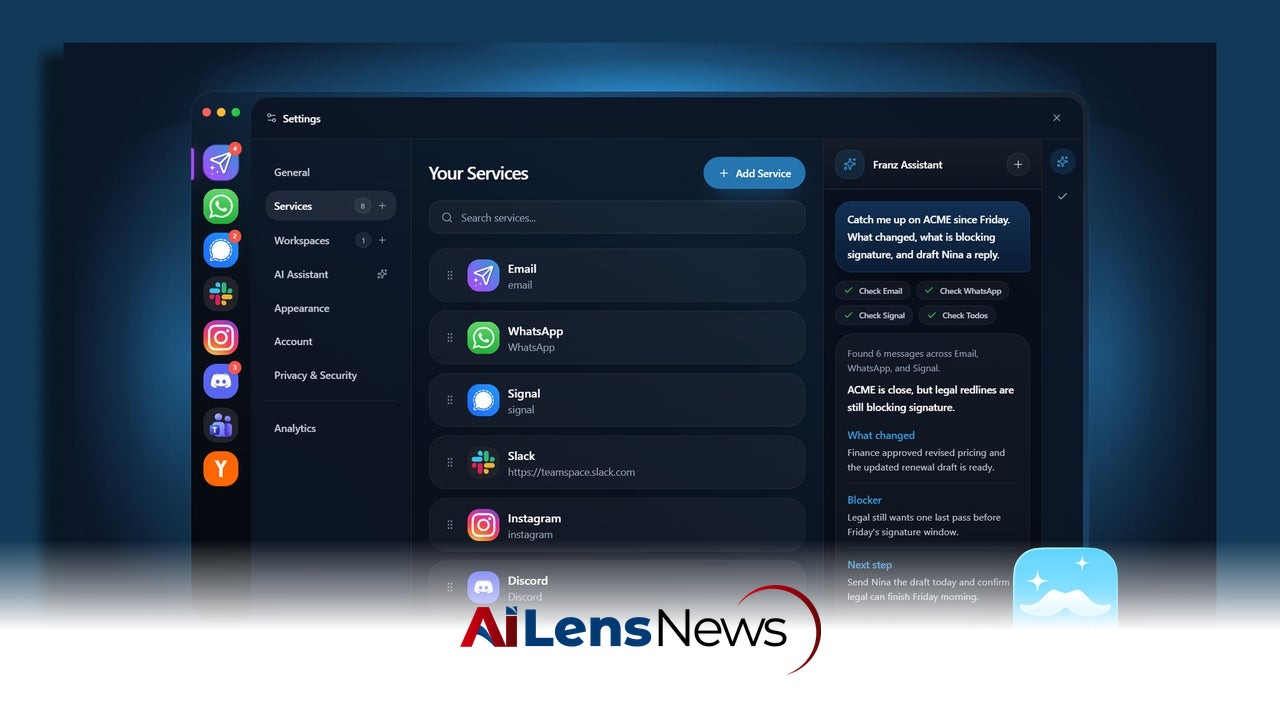


Transform your chaotic workday into a streamlined experience by consolidating all your messaging apps into one unified dashboard. Follow these steps to regain control over your notifications and enhance productivity.
Washington DC, United States Jul 27, 2026 ALN: In today’s fast-paced professional landscape, the sheer volume of communications can feel overwhelming. For many, the workday resembles a high-stakes game of notification whack-a-mole. With the incessant buzzing of Slack channels, the constant pings of Microsoft Teams, multiple email accounts clamoring for attention, and mobile messages cluttering our phones, simply checking if someone needs you can consume a significant portion of your morning. This chaotic environment is not just a personal struggle; it is a widespread phenomenon experienced by professionals across various industries.
The transition to remote work and the reliance on digital communication tools have only exacerbated these challenges. As organizations adapt to a hybrid or fully remote work model, employees often find themselves toggling between different platforms, which can lead to distractions and a significant decrease in productivity. The constant barrage of notifications can hinder one's ability to focus on critical tasks, resulting in a fragmented work experience. Consequently, the need for a streamlined communication process has never been more pressing. Instead of adding more tools to the mix, professionals are increasingly recognizing the value of a single, unified dashboard that aggregates all incoming messages into one central interface, allowing for better control over when and how they engage with communications.
Building such a dashboard may sound daunting, but it can be accomplished in about 20 minutes, fundamentally transforming your chaotic communication flow into a manageable system. Here’s a step-by-step guide on how to create a unified messaging dashboard.
The most effective method to streamline communication is through the use of an aggregator app. This approach eliminates the need for complex webhooks or custom scripts. Instead, it allows users to wrap all their web-based messaging apps into a single desktop window with strict notification filters. By consolidating various communication platforms, this method not only simplifies the work environment but also enhances the ability to focus on tasks without the constant interruption of notifications.
1. Prune your active channels
Before integrating everything into one platform, it’s crucial to perform a thorough audit of your active channels. This process involves declaring notification bankruptcy on channels that do not require real-time attention. By identifying and muting low-priority Teams channels, turning off "channel joined" alerts in Slack, and unsubscribing from non-essential email lists, you can significantly minimize distractions. If a channel does not require immediate action, it should not trigger real-time alerts. This decluttering process not only leads to a more organized workspace but also fosters a clearer mental state, allowing you to focus on what truly matters.
2. Choose and install a dedicated workspace app
The next step is to select a specialized workspace aggregator app such as Rambox, Franz, or Shift. Each of these applications offers free versions with sufficient features for initial setup. These tools are designed to manage multiple messaging platforms from a single interface, thereby reducing the cognitive load associated with switching between different apps. By running communication apps within a standalone, organized window, you can avoid the clutter of multiple browser tabs that consume system memory. This streamlined setup not only improves performance but also enhances the overall user experience, allowing for a more productive workday.
3. Consolidate SMS and mobile messaging
If your workday includes SMS or mobile-first apps such as Signal and WhatsApp, it is essential to integrate these into your desktop setup. For Mac users, leveraging native Messages syncing can simplify this process, while Windows users can utilize Google Messages for Web or Phone Link. By incorporating mobile messaging platforms into your workspace app, you create a centralized communication hub that makes it easier to manage conversations without the constant need to check your phone. Adding these web endpoints alongside your work chat apps fosters a cohesive communication environment, reducing the chances of missing important messages.
4. Kill badge counts and set unified focus hours
While it may seem counterintuitive, turning off red unread badge counters within your aggregator app can significantly enhance focus. Badges often trigger anxiety and a sense of urgency, distracting you from your current tasks. Instead, configure custom notification schedules within your workspace app to ensure alerts only come through during designated check-in windows, such as at 10 AM and 3 PM. This structured approach allows you to manage your time more effectively, dedicating specific periods for checking messages rather than responding to every incoming ping as it occurs.
A common concern when consolidating messages is the fear of missing genuine emergencies. In a professional context, emergencies can range from urgent client requests to critical team updates requiring immediate attention. To address this concern without reverting to keeping every app open on a secondary monitor, consider establishing a dedicated emergency bypass. This setup ensures that you remain accessible for important communications while still enjoying the benefits of a streamlined messaging environment.
One effective method is to set up specific keyword alerts in Slack and Teams (such as your name or the word "URGENT") that trigger sound alerts while muting all general channel activity. This way, you can be assured that crucial messages will reach you even when other notifications are silenced. For email, creating a simple rule that pushes desktop pop-up notifications only for messages from your direct manager or key clients can further prioritize communications that truly matter. This targeted approach allows you to remain responsive without being overwhelmed by less important notifications.
In conclusion, creating a unified messaging dashboard is an effective strategy for simplifying communication and enhancing productivity in the modern workplace. By adopting a catch-all app, pruning unnecessary channels, and establishing focused notification schedules, professionals can reclaim their time and attention. As the workplace continues to evolve, finding ways to streamline communication will be essential for maintaining efficiency and effectiveness in our increasingly digital lives. The implementation of a unified messaging system not only fosters a more organized work environment but also contributes to improved mental well-being, allowing individuals to focus on their tasks without the constant distraction of competing notifications. As businesses and employees navigate this new digital landscape, the ability to communicate effectively will remain a cornerstone of success.
To learn more about the latest developments in Software & Platforms, stay updated with our exclusive reports and analyses on AiLensNews.