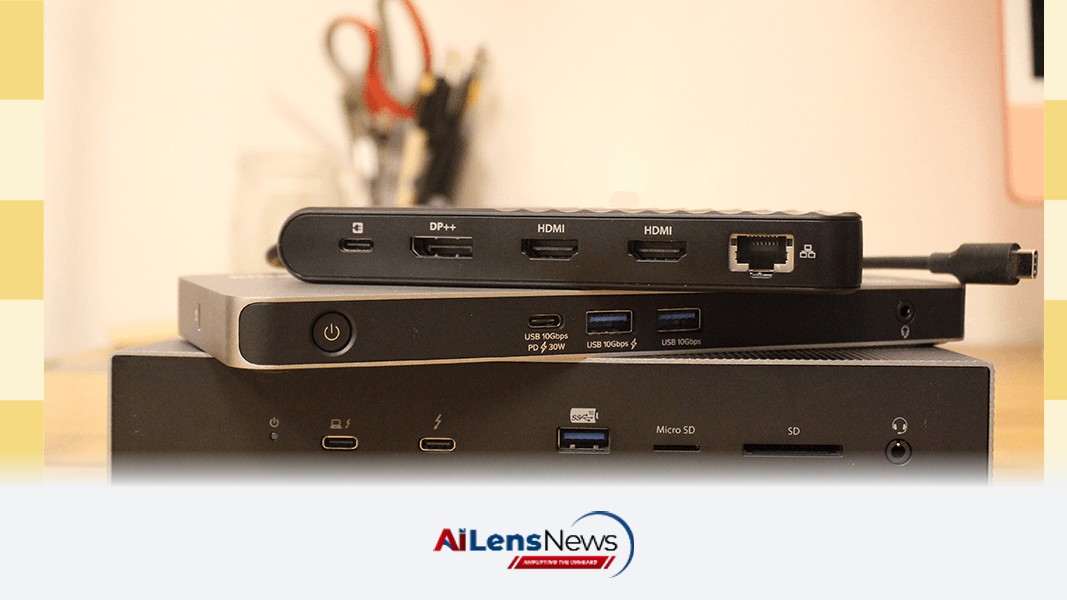



Discover the best laptop docking stations that transform your portable device into a full desktop experience, enhancing productivity and connectivity.
Washington DC, United States Aug 23, 2026 ALN: Laptops are ideal for getting work done when you're out and about, but if you need the functionality of a full workstation, being hunched over a small, flat keyboard can quickly get annoying. However, connecting your laptop to a secondary monitor, a mouse, and a comfier keyboard can turn your desk space into a nest of tangled cables. Not to mention that many of today's laptops are designed to be as thin as possible and don't have the ports you may need to connect some peripherals. That's when it's time to get a laptop docking station.
Laptop docking stations are small boxes that sit on your desk and stay connected to your monitor (or monitors) and peripherals such as speakers, a keyboard, or a mouse. With the right docking station, you can enjoy the portability of a laptop with the flexibility and features of a desktop. These stations can get expensive, though, and it's hard to figure out which to buy based on a list of ports or specs. I've tested many of the most popular options and whittled the list down to the best laptop docking stations for various use cases.
Be sure to check out our other home office guides, including the Ultimate Work-From-Home Gear, Best USB Hubs, Best Office Chairs, Best Flash Drives, and Best Portable External Storage Drives.
Updated August 2026: I've added three new docks I've tested—the Baseus Spacemate Air 12-in-1, Belkin Connect Pro Thunderbolt 4 Dock, and the Belkin Connect USB-C GaN Dock. I've also ensured up-to-date links and prices.
The CalDigit TS5 Plus is not the smallest docking station. It's certainly not the cheapest, either. But it's undoubtedly the best I've tested. There's a reason the CalDigit docks have a sparkling reputation, and the TS5 Plus is the best release so far, sporting the latest Thunderbolt 5 connectivity in a high-end chassis. All the front-facing ports are exactly what you want from a convenience perspective, including SD cards, a headphone jack, multiple USB-C ports, and a USB-A port. Everything is labeled so you never misuse a port, though in this case all the USB-A ports are 10 Gbps across the board, which simplifies knowing which to use.
This dock costs more than many Chromebooks. Is it over the top? For most people, yes. The 10 Gb Ethernet jack alone proves that point, given 2 gigs per second is very fast for home broadband. Most people will never see the benefit, but the TS5 Plus isn't for most people. Laptop docking stations as a whole are meant for serious work that involves lots of accessories and high-resolution displays. If that's you, the CalDigit TS5 Plus is simply the best you can buy.
The Belkin Connect Pro Thunderbolt 4 Dock is compact yet powerful, making it an excellent choice for those who need a reliable dock without taking up too much desk space. It offers a variety of ports including HDMI, USB-C, and Ethernet, making it versatile for different setups. The compact design of this dock is particularly appealing to users in smaller workspaces or those who frequently travel for work. Its ability to support multiple high-resolution displays also makes it a favorite among professionals who require extensive screen real estate for multitasking.
The Plugable Docking Station provides a budget-friendly option without compromising on essential features. It includes multiple USB ports and dual monitor support, making it a great choice for students and professionals alike. This dock is especially appealing for those who are just starting to set up their home office or for users who may not need the high-end features offered by more expensive models. Its affordability does not come at the cost of performance, as it provides reliable connectivity and efficient power management.
The Kensington Dock offers Thunderbolt 5 connectivity at a more accessible price point, making it a solid choice for those looking to upgrade their workstation without breaking the bank. This dock caters to users who want the latest technology in their setup while still being mindful of budget constraints. The Kensington Dock supports a wide range of devices and peripherals, ensuring that users can connect their entire suite of tools without hassle. Its performance is commendable, making it a viable option for both casual users and professionals alike.
Each of these docking stations offers unique features tailored to different needs, ensuring that you can find the perfect match for your workspace. The Baseus Spacemate Air 12-in-1, for example, is designed for users who require a multitude of connections in a single device, making it ideal for those who work with various peripherals simultaneously. Meanwhile, the Belkin Connect USB-C GaN Dock is optimized for power efficiency, utilizing Gallium Nitride technology to provide fast charging capabilities while maintaining a compact form factor.
In conclusion, investing in a quality laptop docking station can significantly enhance your productivity and streamline your workspace. Whether you prioritize portability, price, or performance, there's a docking station that fits your requirements. As the work landscape continues to evolve, particularly with the rise of remote work and flexible office environments, having the right tools, such as a docking station, has become essential. The right docking station not only improves the functionality of your laptop but also helps create a more organized and efficient workspace, which can lead to increased productivity and a better overall work experience.
To learn more about the latest developments in Gadgets & Devices, stay updated with our exclusive reports and analyses on AILensNews.