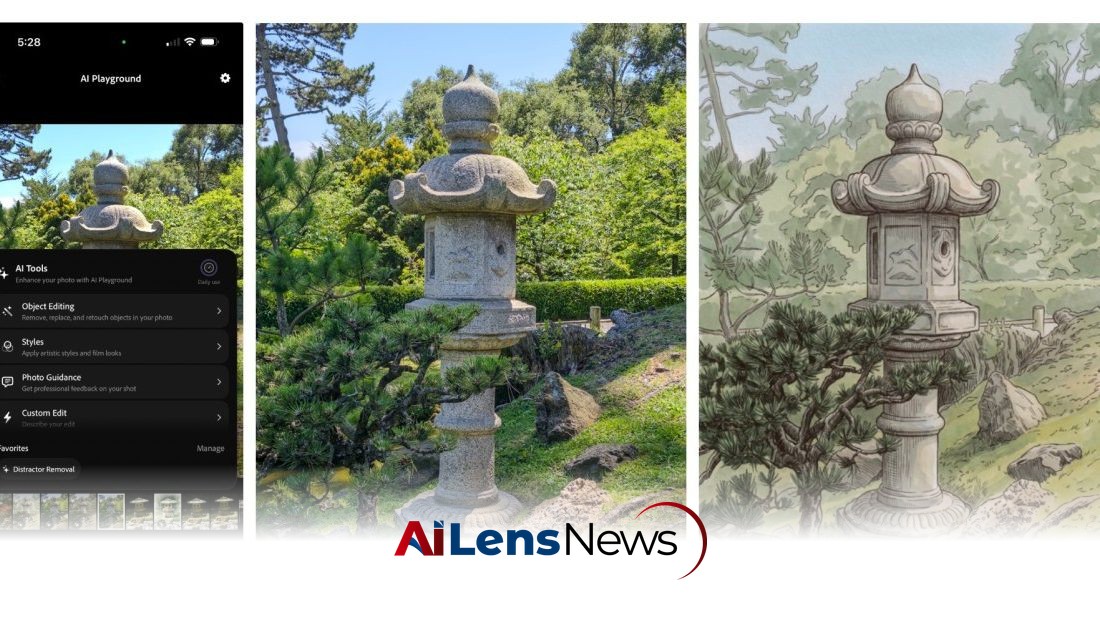


Adobe's Project Indigo enhances its iOS camera app with AI tools for photo critique, advanced object removal, and style transfer, aiming to improve user photography skills.
Washington DC, United States Jul 20, 2026 ALN: Adobe is adding new AI-powered features to its experimental iOS camera app called Project Indigo, launched last year. The app previously offered pro controls, multi-frame super-resolution, and different capture modes, and is now adding features that will use LLMs (large language models) to critique photos and provide editing suggestions.
Adobe, a leader in digital media software, has a long history of integrating innovative technologies into its products. Project Indigo represents the company's foray into leveraging artificial intelligence, particularly in the realm of photography. This initiative aligns with a broader trend in the tech industry where companies are increasingly incorporating AI to enhance user experience and streamline creative processes.
The app is not just a tool for taking pictures; it is designed to educate users about photography. The introduction of AI critique features is particularly noteworthy as it aims to provide users with feedback that can help them improve their photography skills. This is significant because many photography apps focus primarily on editing rather than teaching. By offering constructive feedback on aspects such as framing, lighting, and emotional impact, Project Indigo could serve as a valuable learning resource.
In addition to the photo critique feature, Project Indigo is also adding other AI capabilities such as advanced object removal, depth of field generation, and the ability to apply different artistic styles to photos. These features are part of a growing suite of tools that aim to make photography more accessible to a wider audience, including those who may not have extensive technical knowledge or experience.
Marc Levoy, who is heading Adobe’s Project Indigo, previously developed the camera technology for Google Pixel phones. His experience in this area is invaluable, as he brings a wealth of knowledge about camera functionality and image processing. Levoy's insights indicate that while many generative AI tools offer prompt-based editing options, they can often lead to inconsistent results. This is why the new features in Project Indigo are designed to provide more deterministic outputs, making the editing process more straightforward for users.
For example, Google’s camera coach feature for Pixel phones, launched last year, provided users with generic framing suggestions. In contrast, Project Indigo aims to offer more specific and actionable advice that can help users learn and improve their photography skills. This educational aspect of the app is particularly appealing to amateur photographers who are looking to enhance their craft.
The two main features within the critique category are the photo critique tool and the capture and edit suggestions. The photo critique tool provides a "professional" opinion on various aspects of a photo, including framing, lighting, colors, and emotional impact. This can help users understand what makes a photograph compelling and how to achieve similar results in their own work.
The second feature, capture and edit suggestions, offers practical tips for reshooting photos. For instance, if a user captures an image with an unwanted object in the frame, the app might suggest removing that object or adjusting the composition for a better shot. This feature not only improves the quality of the final image but also encourages users to think critically about their photographic choices.
Furthermore, the app provides guidance on how to enhance existing photos using Adobe Lightroom controls. This integration emphasizes Adobe's commitment to providing users with a comprehensive suite of tools for photo editing and enhancement, allowing for a seamless workflow from capture to final edit.
While photography apps like Apple Photos, Google Photos, and Adobe Photoshop have included object removal features for years, these often require users to manually select or circle objects on the screen. This method can be imprecise and frustrating, particularly for novice users. Project Indigo’s new object removal feature simplifies this process by allowing users to toggle options for common unwanted elements, such as background people, trash, and other distractions. The ability to describe custom objects for removal further enhances the app's usability and effectiveness, as users can tailor the removal process to their specific needs.
The results of the object removal feature have been reported as impressive, with users noting that the app can effectively eliminate subjects without leaving behind noticeable artifacts. This capability is crucial for maintaining the integrity of the photograph while enhancing its overall composition.
In addition to object removal, the app offers a depth of field generation feature, which simulates a blurred background effect. This is particularly useful for photographers looking to achieve a professional look in their portraits or macro photography, where a shallow depth of field can help to isolate the subject from the background.
Adobe is also experimenting with a style transfer feature that allows users to apply various artistic styles to their photos. This feature enables users to transform their images into styles reminiscent of watercolor paintings, ink sketches, and more. While style transfer is not a new concept in the realm of digital art and photography, its inclusion in Project Indigo reflects Adobe’s commitment to providing users with creative tools that encourage experimentation and artistic expression.
Despite Marc Levoy's criticism of the prompt-based editing approach common in many generative AI tools, Project Indigo does include a feature that allows users to describe their desired edits. This feature aims to provide flexibility in editing that preset tools may not offer. However, it also raises concerns about the potential for users to create unsatisfactory results if they do not have a clear understanding of how to articulate their editing needs.
The AI features of Project Indigo are powered by Google’s Gemini-based Nano Banana, although Adobe has indicated that it is open to integrating other models, including its own Adobe Firefly model. This flexibility in technology choices allows Adobe to adapt and improve its app as new advancements in AI and machine learning emerge.
Currently, these features are still in a testing phase, and access is limited to select users. While it remains uncertain whether these features will eventually be rolled out to a broader audience, their development is a promising step toward enhancing the photographic experience for users of all skill levels. The emphasis on educating users about the nuances of photography, rather than solely focusing on generating aesthetically pleasing images, marks a significant shift in how photography apps can engage and empower their users.
In conclusion, Adobe's Project Indigo is set to redefine how users interact with photography through AI-powered features that not only enhance image quality but also foster learning and creativity. As the app continues to evolve, it may pave the way for a new generation of photography tools that prioritize both technical proficiency and artistic expression.
To learn more about the latest developments in Software & Platforms, stay updated with our exclusive reports and analyses on AiLensNews.