

More
Checking your session



Discover how AI image generators like Dreamina's Seedream 5.0 Pro allow users to create professional-quality photos without traditional equipment.
New Delhi, India Aug 27, 2026 ALN: Studio rental, lighting equipment, a photographer's day rate, retouching software — creating a single polished professional photo has traditionally involved a long list of costs before you even press the shutter. These days, that entire chain can be replaced by an AI image generator and a well-written prompt, no camera required.
Dreamina, powered by its most advanced image generation model, Seedream 5.0 Pro, has made this shift especially convincing. It doesn't produce something that merely looks "AI-generated" — it produces images with the lighting, composition, and detail of an actual professional shoot. Let's break down how to get there.
Professional photography has always been gatekept by access — access to equipment, studio space, and skilled photographers. What's changed recently is that the technical craftsmanship behind a "professional" photo (lighting, composition, focus, color grading) can now be described in words and generated directly. This doesn't replace photographers for every use case, but for headshots, product shots, and marketing visuals, it's removed a massive barrier to entry.
Before generating anything, it helps to understand what actually reads as "professional" versus casual:
Once you can name these elements, you can start requesting them directly in your prompts instead of hoping the model guesses correctly.
A lot of the credibility in these results comes down to Seedream 5.0 Pro's underlying capabilities. Its pinpoint precision editing gives you point selection, lasso tools, sketch guidance, and regional controls, so you can fine-tune specific details like a stray hair or a shadow without regenerating the whole image. The 2K output quality preserves the kind of texture, lighting, and shadow detail that makes a photo feel genuinely captured rather than rendered.
Its deep reasoning generation also analyzes your prompt's composition and lighting intent before creating the image, which matters enormously for portraits and professional shots where small inconsistencies are easy to spot. And because it supports 14 languages, teams working across different regions can generate consistent, professional-grade visuals without a language barrier slowing things down.
Here's the exact process for generating a professional-quality photo from scratch.
Start by navigating to Dreamina and writing a detailed text prompt describing a person dressed appropriately for the professional context you're going for. Adding a reference image, if you have one, helps Dreamina match specific facial features, styling, or pose more precisely.
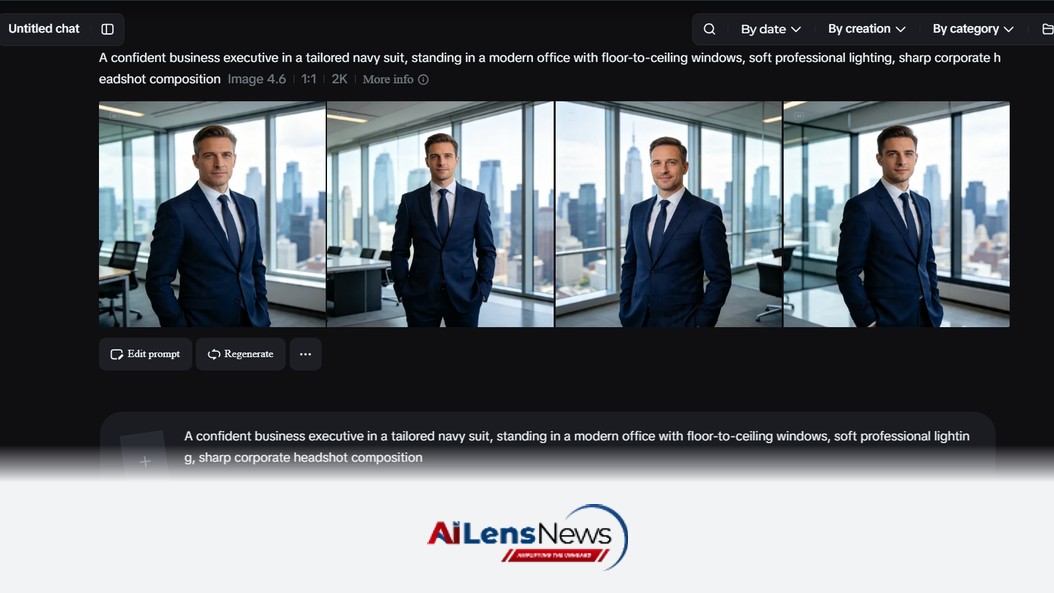
For example: A confident business executive in a tailored navy suit, standing in a modern office with floor-to-ceiling windows and soft natural light, sharp focus, shallow depth of field, professional corporate headshot style.
The more clearly you describe lighting and setting, the more the result will feel studio-shot rather than casual.
Next, fine-tune your settings before generating. Choose Image 5.0 Pro, powered by Seedream 5.0 Pro, as your model, then select your aspect ratio, image size, and resolution, going with 1K for quick previews or 2K when you need crisp, print-ready detail. Once you're set, click Dreamina's generate icon to produce your photo.
Once you have your image, polish it further with Dreamina's AI customization tools — inpaint to fix small flaws, expand to widen the frame or background, remove to eliminate unwanted elements, and retouch to smooth and sharpen final details. When it looks right, click the Download icon to save your finished professional photo.
Professional photographers spend years learning to control light with softboxes, reflectors, and diffusers. You can borrow their vocabulary directly in your prompts instead:
Dropping these terms into a prompt gives the model specific direction instead of defaulting to generic, flat lighting.
The setting behind your subject matters just as much as the subject itself. A cluttered or ambiguous background instantly reads as amateur, while a clean or purposeful one signals professionalism:
This approach has found real traction across a range of practical use cases:
A few habits tend to undercut otherwise strong results:
You don't need a camera, a studio, or a photographer's day rate to get a genuinely professional photo anymore — just a clear sense of what "professional" looks like and the right AI image generator to execute it. With Dreamina and its advanced Seedream 5.0 Pro model, the lighting, composition, and detail of a real photo shoot are just a well-written prompt away.
To learn more about the latest developments in Artificial Intelligence, stay updated with our exclusive reports and analyses on AILensNews.

The potential acquisition of Hugging Face by Nvidia for $12.9 billion raises con…

In a stark warning, OpenAI and over 100 industry leaders highlight the urgent ne…

As opposition to AI data centers grows, tech leaders label the movement a 'psyop…

Google employees are testing the Gemini 3.8 Flash AI model, indicating a potenti…
Recent research indicates a significant decline in optimism about artificial int…